
顶部应用栏 (Top App Bars)
顶部应用栏(在 M3 中简称为 App Bar)放置在屏幕顶部,帮助用户在应用中进行导航和操作。
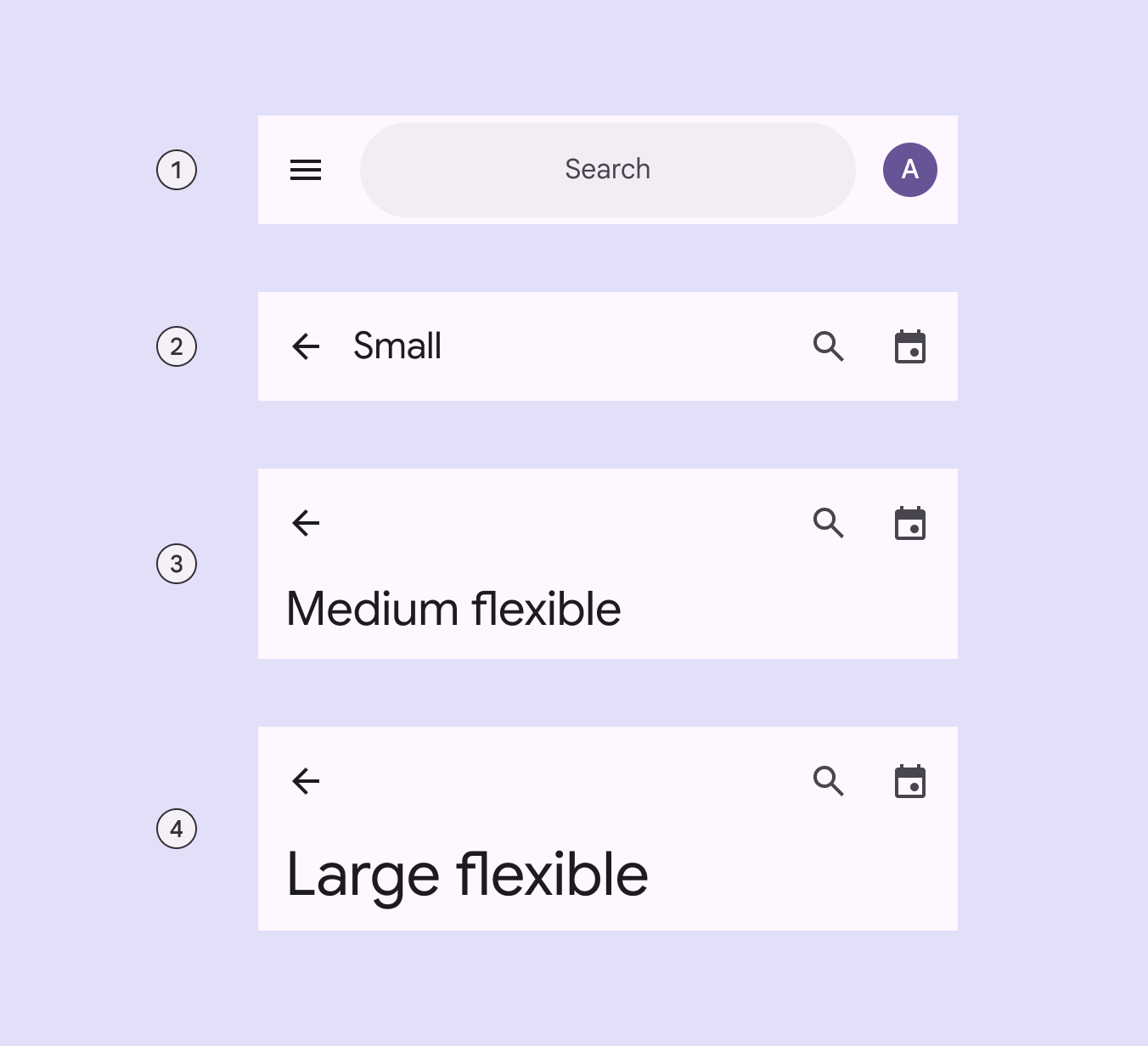
变体对比
M3 提供了四种主要的顶部栏变体:
| 类型 | 描述 | 适用场景 |
|---|---|---|
| Search app bar | 带有搜索输入框的栏 | 以搜索为核心功能的首页 |
| Small | 最小高度,单行标题 | 详情页、设置页 |
| Medium flexible | 初始标题较大,滚动时折叠 | 分类首页 |
| Large flexible | 初始标题巨大,提供最强视觉引导 | 应用主入口 |
核心属性
容器属性
| 元素 | 属性 | 默认值 |
|---|---|---|
| 颜色 | android:background | ?attr/colorSurface |
| 海拔 (Elevation) | android:elevation | 4dp |
标题与导航
| 元素 | 属性 | 相关方法 |
|---|---|---|
| 标题文本 | app:title | setTitle() |
| 副标题 | app:subtitle | setSubtitle() |
| 导航图标 | app:navigationIcon | setNavigationIcon() |
| 标题居中 | app:titleCentered | true / false |
代码实现
1. 基础用法 (Small)
xml
<com.google.android.material.appbar.AppBarLayout
    android:layout_width="match_parent"
    android:layout_height="wrap_content">

    <com.google.android.material.appbar.MaterialToolbar
        android:id="@+id/topAppBar"
        android:layout_width="match_parent"
        android:layout_height="wrap_content"
        android:minHeight="?attr/actionBarSize"
        app:title="页面标题"
        app:menu="@menu/top_app_bar"
        app:navigationIcon="@drawable/ic_close" />

</com.google.android.material.appbar.AppBarLayout>
kotlin
topAppBar.setNavigationOnClickListener {
    // 处理导航图标点击
}

topAppBar.setOnMenuItemClickListener { menuItem ->
    when (menuItem.itemId) {
        R.id.favorite -> {
            // 处理收藏
            true
        }
        else -> false
    }
}
2. 可折叠应用栏 (Large)
使用 CollapsingToolbarLayout 实现滚动时的标题缩放效果。
xml
<com.google.android.material.appbar.AppBarLayout
    android:layout_width="match_parent"
    android:layout_height="wrap_content">

    <com.google.android.material.appbar.CollapsingToolbarLayout
        style="?attr/collapsingToolbarLayoutLargeStyle"
        android:layout_width="match_parent"
        android:layout_height="?attr/collapsingToolbarLayoutLargeSize"
        app:layout_scrollFlags="scroll|exitUntilCollapsed|snap">

        <com.google.android.material.appbar.MaterialToolbar
            android:layout_width="match_parent"
            android:layout_height="?attr/actionBarSize"
            app:layout_collapseMode="pin" />

    </com.google.android.material.appbar.CollapsingToolbarLayout>
</com.google.android.material.appbar.AppBarLayout>
滚动行为
自动提升
使用 app:liftOnScroll="true",当下方内容滚动时,App Bar 会自动增加阴影并改变颜色以示区分。
xml
<com.google.android.material.appbar.AppBarLayout
    app:liftOnScroll="true">
    ...
</com.google.android.material.appbar.AppBarLayout>
压缩效果 (Compress)
你可以设置 app:layout_scrollEffect="compress",使 App Bar 在滚动时产生裁剪压缩效果,这是 M3 推荐的新视觉表现。
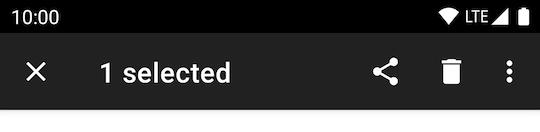
上下文操作栏 (Contextual action bar)
当用户选择项目时,App Bar 可以转换为上下文操作栏。
kotlin
val callback = object : ActionMode.Callback {
    override fun onCreateActionMode(mode: ActionMode?, menu: Menu?): Boolean {
        mode?.menuInflater?.inflate(R.menu.contextual_menu, menu)
        return true
    }
    // ... 其他回调
}
startSupportActionMode(callback)