
底部应用栏 (Bottom App Bars)
弃用说明
在 M3 设计系统中,Bottom App Bar 正在逐渐被 Docked Toolbar 取代,后者更短且更灵活。但目前 Bottom App Bar 仍然可以使用。
底部应用栏在移动设备屏幕底部显示导航和关键操作。

结构分解
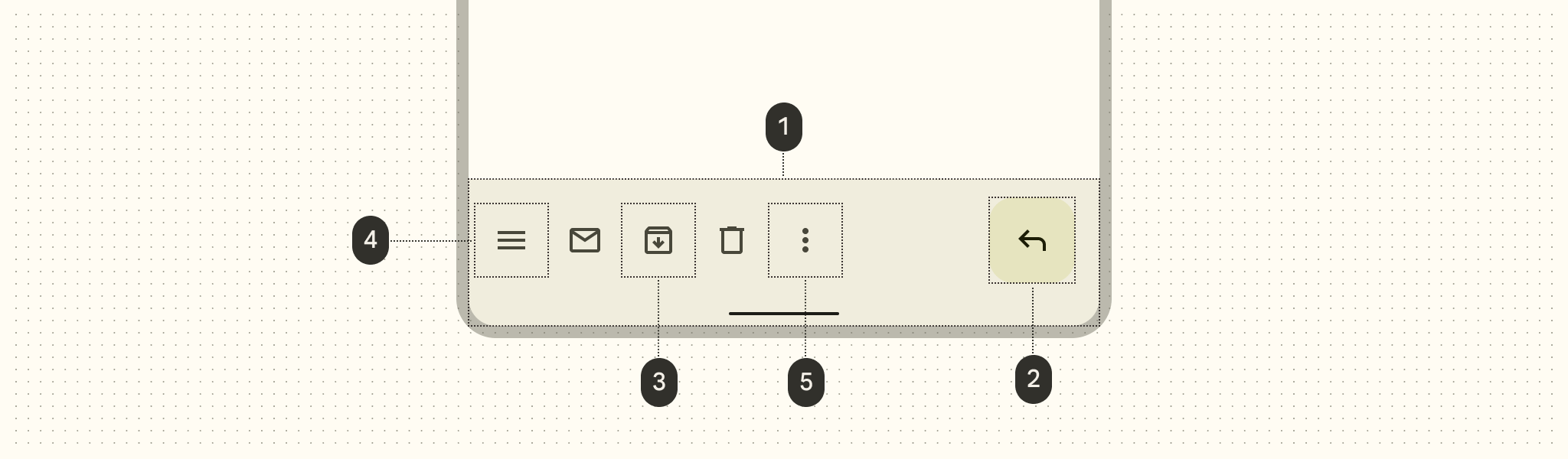
- 容器 (Container)
- 悬浮操作按钮 (FAB) (可选)
- 操作项 (Action items)
- 导航图标 (Navigation icon)
- 溢出菜单 (Overflow menu)
核心属性
| 属性 | 描述 | 默认值 |
|---|---|---|
app:backgroundTint | 背景颜色 | ?attr/colorSurfaceContainer |
app:fabAlignmentMode | FAB 的对齐方式 | end (或 center) |
app:fabAnimationMode | FAB 移动时的动画 | slide (或 scale) |
app:hideOnScroll | 滚动时是否自动隐藏 | false |
代码实现
基础用法 (嵌入 FAB)
xml
<androidx.coordinatorlayout.widget.CoordinatorLayout ...>

    <com.google.android.material.bottomappbar.BottomAppBar
        android:id="@+id/bottomAppBar"
        android:layout_width="match_parent"
        android:layout_height="wrap_content"
        android:layout_gravity="bottom"
        app:navigationIcon="@drawable/ic_menu"
        app:menu="@menu/bottom_bar_menu" />

    <com.google.android.material.floatingactionbutton.FloatingActionButton
        android:layout_width="wrap_content"
        android:layout_height="wrap_content"
        app:layout_anchor="@id/bottomAppBar"
        app:srcCompat="@drawable/ic_add" />

</androidx.coordinatorlayout.widget.CoordinatorLayout>
kotlin
bottomAppBar.setOnMenuItemClickListener { menuItem ->
    when (menuItem.itemId) {
        R.id.search -> {
            // 处理搜索
            true
        }
        else -> false
    }
}
滚动行为
要在滚动内容时自动隐藏底部栏,只需开启 app:hideOnScroll:
xml
<com.google.android.material.bottomappbar.BottomAppBar
    ...
    app:hideOnScroll="true" />
主题化
你可以通过修改 colorSurfaceContainer 和 colorOnSurface 来定义底部栏的外观。
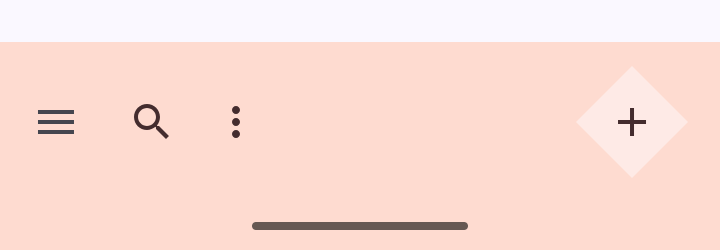 (图示:通过切角形状自定义底部栏边缘)